Ojin is now listed among Pipecat's video services. If you build voice agents with Pipecat, you can now make them feel more human, with a real face whose lips move in sync with every word and whose expression follows the emotion in the voice. It takes one more service in the pipeline you already have. We built this community integration and we maintain it, and we're proud to see it listed in Pipecat's docs next to the other avatar providers.
Pipecat is an open source Python framework for building real-time voice and multimodal agents. You build an agent from pluggable services for speech recognition, language models, text-to-speech and transport, and that design is why adding a face fits so neatly.
One Service After Your TTS
transport.input() -> STT -> LLM -> TTS -> [OjinVideoService] -> transport.output()
That's the whole change. Install the package:
uv add pipecat-ojin
Then add the service to your pipeline:
from pipecat_ojin import OjinVideoService, OjinVideoSettingsavatar = OjinVideoService( OjinVideoSettings( api_key=os.environ["OJIN_API_KEY"], config_id=os.environ["OJIN_CONFIG_ID"], ))pipeline = Pipeline([transport.input(), stt, llm, tts, avatar, transport.output()])
OjinVideoService sits right after text-to-speech, the same slot Pipecat's other video services use. It takes whatever audio your TTS produces, sends it to Ojin and gets back avatar video with the lips matched to that audio. It reads two settings, and you get both from ojin.ai: OJIN_API_KEY, and OJIN_CONFIG_ID, which picks the face model to drive.
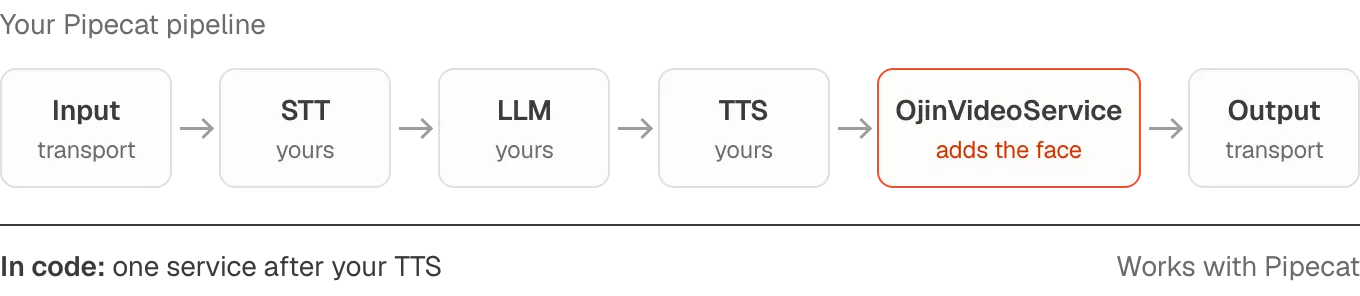
Everything else stays yours. You bring your own speech recognition, language model and text-to-speech, so your users hear the voice you chose. Your prompts and conversation logic stay as they are. Ojin adds the face, in sync with that voice.
pipecat-ojin is on PyPI and open source on GitHub under the BSD-2-Clause licence. It's a community integration, which means we write and maintain it and issues come to our repository. It uses pipecat-ai as an ordinary library, so there's no fork to keep up with. We've tested it with Pipecat v1.3.0 and v1.16.0 on Python 3.11 or newer.
Faces Add Trust
People trust a conversation more when they can see who they're talking to. A few places where that matters:
- In training, people rehearse a hard conversation with a buyer or a colleague who reacts face to face.
- In customer support and onboarding, the person explaining a problem can see who they're explaining it to.
- In sales, an agent that recommends a product and guides the purchase does it face to face.
- As brand hosts and event companions, agents welcome visitors and give them someone to talk with.
- In fan engagement, a talent's AI double can answer every fan.
- In learning, the learner can talk to a tutor they can see, or to a figure from history.
You don't rebuild your agent for any of these. The conversation you've already built on Pipecat stays the same, and people now get to see the agent they're talking to.
We Run It Ourselves
Our own Human Agents voice bot is built on Pipecat, and it runs on pipecat-ojin. So the package you install is the one our agents use every day, in our own product.
That matters for anyone deciding whether to depend on it. We aren't keeping a separate demo version for the community while our product runs on something else. There's one package. When we improve it for our own agents, you get the same improvement.
Two Ways to Deliver the Video
By default, the service pushes synchronised audio and video frames to your transport, the same way Pipecat's other video services work. The transport carries them to your user, and nothing else in your setup changes.
If your agent already lives in a LiveKit room, you can pass WebRTC settings instead. Ojin then joins your room as a participant called ojin-avatar and publishes the avatar straight into the room, so the video doesn't pass through your bot. In this mode the service pushes no audio or video frames itself. The rest of the pipeline stays exactly as it was. The repository includes a foundational example of a complete LiveKit pipeline, so you can start from working code.
What the SDK Handles
Underneath the service sits ojin-client, our SDK. It does the timing work you'd otherwise have to write and keep tuning yourself:
- It keeps audio and video in sync, using the audio as the playback clock.
- It re-syncs the face when the user interrupts the agent.
- It shapes the TTS audio it forwards to Ojin, so lip-sync stays stable whatever rhythm your TTS produces.
You don't manage input buffering, the playback clock or dropped frames. Your agent talks, the user cuts in, the agent answers, and the face follows along the whole time.
Get Started
Install pipecat-ojin, get your API key and config ID from ojin.ai, and add the service after your TTS. The package on GitHub has the code and the LiveKit example, and our docs cover the rest.
Your config ID picks one of two face models. Human Presence is for the most lifelike conversations. Human Portrait is built for speed and scale.
Pipecat lets you swap any piece of a voice agent without touching the rest, and with pipecat-ojin the face is one more piece you can add.